 Balansure
Stop uploading bank statements. Convert them offline for $49.
Balansure is a bank statement converter for Mac and Windows. It turns PDF statements into Excel, CSV, Xero or QuickBooks Online files on your own computer. It checks every row against the printed balance, so the numbers you export add up.
One payment, no subscription. One key works on two computers.
How does Balansure check a statement?
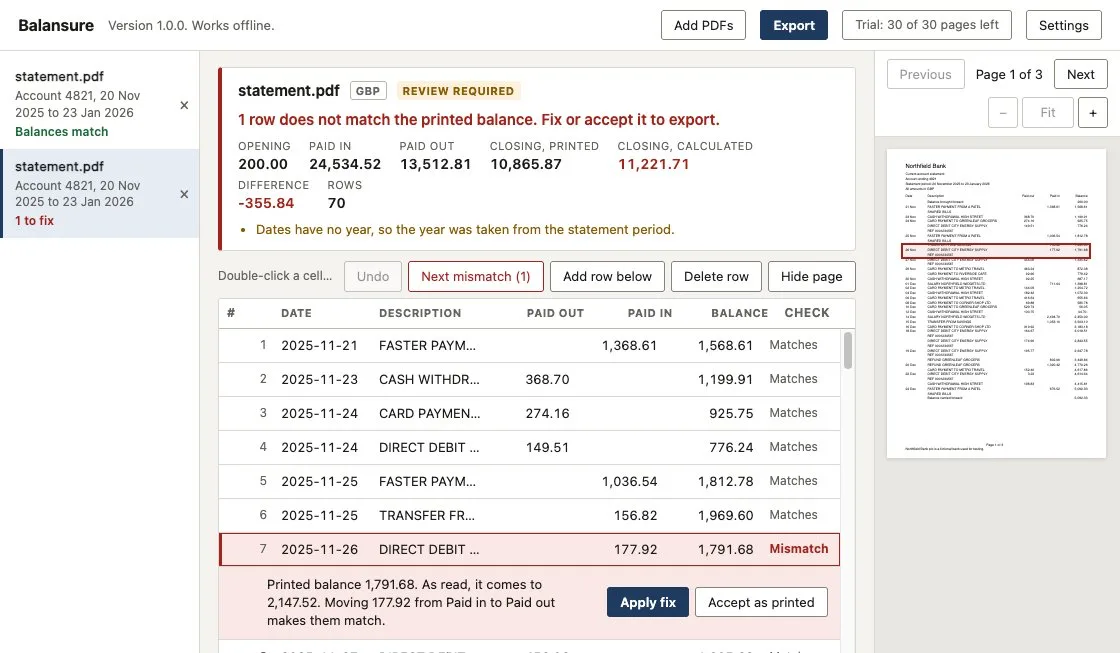
Every statement has to add up: opening balance, plus money in, minus money out, equals the closing balance. Balansure runs that sum on every row, against the balance the bank printed beside it. One wrong row shows up at that row, not as a vague total at the end.
A 70-row statement, read from the PDF.
Every row so far matches the balance printed beside it.
Row 7 doesn't. The statement is 355.84 out.
177.92 was read as money in. Balansure says so, and offers the fix.
One click moves it to money out. Difference: 0.00.
Balances match. 70 of 70 rows checked, ready to export.
- Opening
- 200.00
- + Paid in
- 24,534.5224,356.60
- − Paid out
- 13,512.8113,690.73
- = Calculated
- 11,221.7110,865.87
- Printed
- 10,865.87
| Description | Paid out | Paid in | Balance | Check | ||
|---|---|---|---|---|---|---|
| Faster payment | 1,368.61 | 1,568.61 | Matches | |||
| Cash withdrawal | 368.70 | 1,199.91 | Matches | |||
| Card payment | 274.16 | 925.75 | Matches | |||
| Direct debit | 149.51 | 776.24 | Matches | |||
| Faster payment | 1,036.54 | 1,812.78 | Matches | |||
| Transfer | 156.82 | 1,969.60 | Matches | |||
| Direct debit | 177.92 | 177.92 | 1,791.68 | MismatchEdited | ||
Moving 177.92 from Paid in to Paid out makes them match.Apply fix | ||||||
Do my bank statements get uploaded?
No. Balansure reads, checks and exports every PDF on your computer. No statement, file name or figure is sent anywhere, so there is no server holding your clients' bank data.
Your clients trusted you with those statements, not a website you found this morning.
- The app window is blocked from making web requests. It works only with the files you open.
- One connection, once. Activating or removing a licence key contacts licence.mfahadiqbal.com with the key, a hashed computer ID and the app version.
- No analytics, no crash uploads, no automatic updates.
- Works with the Wi-Fi off. The trial never needs the internet, and the full version needs it only for that one activation.
Which bank statements can Balansure read?
Text-based PDF statements, the kind you download from online banking. There are no per-bank templates to wait for: Balansure finds the transaction table on the page and reads it, then the balance check tells you whether it read it right.
Layouts it has been tested on
- Separate paid in and paid out columns
- Withdrawals and deposits columns
- Debit and credit columns
- One signed amount column, or amounts in brackets
- CR and DR markers, including overdrawn balances
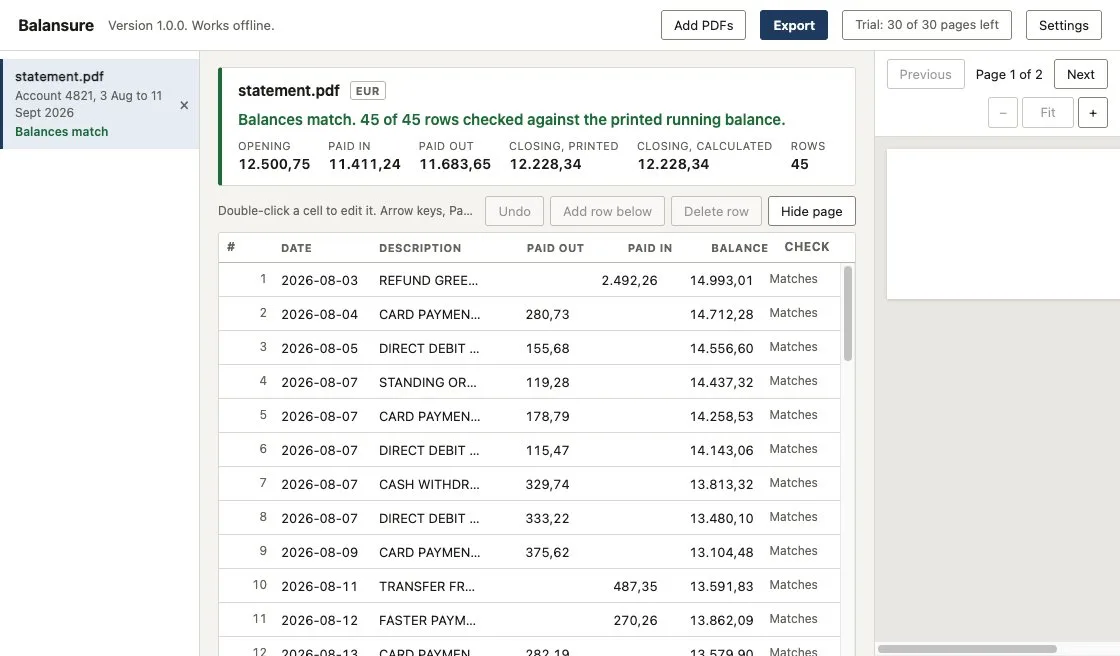
- Decimal commas (1.234,56) and space thousands (1 234,56)
- Dates without a year, filled in from the statement period
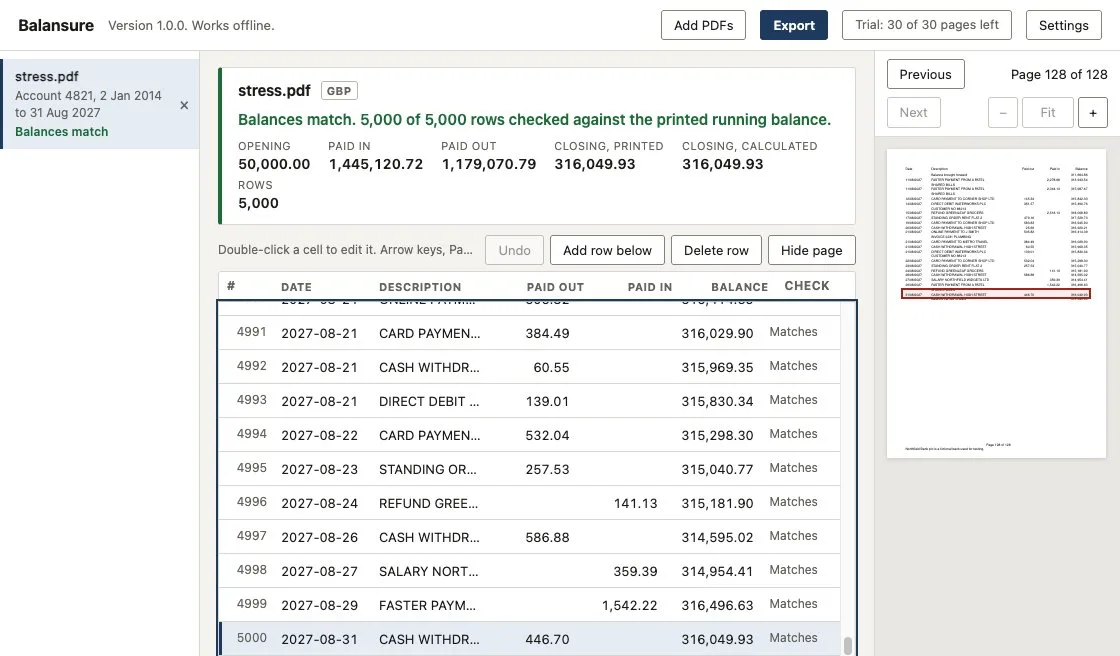
- Multi-page statements, up to 5,000 rows in our tests
- Password-protected PDFs: you type the password in the app
What it does not read
Scanned or photographed statements. There is no OCR, so a scanned page is skipped and the app tells you which one. If most of your statements are scans, an upload service with OCR will suit you better.
Which formats can I export?
Five, all included. Pick the date format (31/12/2026, 12/31/2026, 31.12.2026 or 2026-12-31) and export one statement or all of them at once.
| Format | What you get | Use it for |
|---|---|---|
| Excel workbook (.xlsx) | One sheet per statement plus a summary sheet. Real dates and numbers. | Working papers, reconciliations, filters and pivot tables |
| CSV, all columns | Date, description, paid in, paid out, amount and balance | Any spreadsheet or import tool |
| Xero bank statement CSV | Date, Amount and Description | Import a statement in Xero |
| QuickBooks Online CSV | Date, Description and Amount, money out as a negative number | Uploading transactions to a bank account in QuickBooks Online |
| OFX bank statement (beta) | A standard OFX file. The bank ID is written as 000000000 because statements do not print one. | Software that imports OFX |
Balansure 1.0 does not make QBO (Web Connect) files.
How does Balansure compare with online converters?
Most bank statement converters are websites: you upload the PDF and pay every month. Balansure runs on your computer and you pay once.
| Product | Where statements are processed | Price |
|---|---|---|
| Balansure | Your Mac or PC, offline | $49 once |
| DocuClipper | Uploaded to its servers | From $20.30 a month, billed yearly, for 60 pages a month |
| BankStatementConverter | Uploaded to its servers | From $15 a month |
| ProperConvert | Desktop app | $19.99 a month or $179.99 a year |
Prices from each company's own pricing page, checked on 22 November 2026. Those services read scanned PDFs; Balansure does not.
How do I install Balansure?
Download the version for your computer. The free trial starts as soon as it opens: 30 pages, every format, no sign-up. Version 1.0.0, released 22 November 2026.
Windows
Windows 10 or 11, 64-bit
- Open Balansure-1.0.0-windows-setup.exe.
- Windows shows Windows protected your PC, because version 1.0 is not code-signed yet.
- Click More info, then Run anyway.
- Follow the installer, then open Balansure from the Start menu.
macOS
macOS 12 Monterey or later
- Open the .dmg and drag Balansure into Applications.
- Open Balansure. macOS blocks the first open, because version 1.0 is not notarised yet.
- Go to System Settings, then Privacy & Security, scroll to the message about Balansure and click Open Anyway.
- On macOS 14 or earlier you can instead Control-click the app and choose Open.
Not sure which Mac you have? Apple menu, then About This Mac. "Chip: Apple M" means Apple silicon; "Processor: Intel" means Intel.
SHA-256 checksums, to confirm your download is complete and unchanged:
- e47639b6a016ab32393e1f6e0f0e5add46420f70f173d85373b4cfa839ee9323 Balansure-1.0.0-mac-arm64.dmg
- 3442893cc3a057da9c0eef69ad45d86fc0875881ee3d3ef003843b413667fb34 Balansure-1.0.0-mac-x64.dmg
- 6da87e84a1dfe3a02f16643df1786a742eb173d77b912cbc07b73a977b5fc99c Balansure-1.0.0-windows-setup.exe
How much does Balansure cost?
$49once
Prices in US dollars. Gumroad shows the total with any local tax at checkout.
- No subscription. Pay once, keep using it.
- Two computers on one licence key. Move it in Settings when you change machines.
- Every format, no page limits.
- Try first: the free trial covers 30 pages, and exporting a file again does not use more.
Payment is handled by Gumroad. Your licence key is emailed to the address you pay with.
Questions
What is a bank statement converter?
A program that reads the transactions in a PDF bank statement and saves them as a spreadsheet or an import file, so nobody has to retype them. Balansure does this on your own computer and checks the result against the balances printed on the statement.
Can I convert a PDF bank statement to CSV?
Yes. Open the PDF in Balansure, check the rows, and export CSV with all columns (date, description, paid in, paid out, amount, balance), or the 3-column layouts for Xero and QuickBooks Online.
How do I convert a bank statement to Excel?
Open the PDF in Balansure, fix anything it flags, and export an Excel workbook (.xlsx). You get one sheet per statement plus a summary sheet, with real dates and numbers you can filter and sum.
How do I import a bank statement into Xero?
Export the Xero bank statement CSV from Balansure. In Xero, open the bank account, choose Import a statement, upload the file and match the Date, Amount and Description columns.
Can I import PDF bank statements into QuickBooks?
Not as a PDF. Convert it first: Balansure exports a QuickBooks Online CSV with Date, Description and Amount, money out as a negative number, which you upload to the bank account in QuickBooks Online. Balansure 1.0 does not make QBO (Web Connect) files.
Does Balansure upload my bank statements?
No. Every PDF is read, checked and exported on your computer. The app connects to the internet only to activate or remove a licence key, and that request carries the key, a hashed computer ID and the app version. Nothing from your statements.
Does Balansure read scanned statements?
No. It reads text-based PDFs, the kind you download from online banking. Scanned pages are skipped and the app tells you which page. There is no OCR.
What happens when a row does not match the balance?
The row turns red and Balansure shows the printed balance next to what it read. When it can tell what went wrong, such as an amount in the wrong column, it offers a one-click fix. You can also edit any cell, add or delete rows, or accept the row as printed. A statement with an open mismatch cannot be exported until you fix it or accept it.
Is Balansure a subscription?
No. It costs $49 once. One licence key works on two computers.
What does the free trial include?
30 pages of exports in every format, with no time limit and no sign-up. Exporting a file you already exported again does not use more pages.
Why does Windows or macOS warn me when I install Balansure?
Version 1.0 is not code-signed yet, so Windows shows "Windows protected your PC" and macOS blocks the first open. On Windows, click More info, then Run anyway. On macOS, open System Settings, then Privacy & Security, and click Open Anyway next to the message about Balansure. Full install steps.
Does Balansure work without internet?
Yes. The trial never needs the internet. After a one-time activation of your licence key, the full version does not need it either.
How do I get help?
Email m.fahadiqbalofficial@gmail.com, or use Report a problem in the app. It opens a draft in your own email app with the app version and recent errors, with file names and folders removed, and nothing is sent until you press Send.
Your statements stay on your computer. The rows add up before you export.
$49 once for Mac and Windows. Try 30 pages free first.